Mobile application creation

Mobile app development, built for work in the field.

In the field, at a client or between two appointments, the application must help complete an action. We start from this situation to choose the right product form.

Umbeli
On site

The right file. At the right time.

My intervention
Add a note
Prepare sending
Visible trackingFrom phone to file
Journey illustration · conceptual interface

Your reality, our starting point

Mobile process · Prototype · Development

For field services, construction, workshops, sales teams, and companies wishing to offer a mobile space to their clients.

Creating a mobile application starts with a question of context. Who holds the phone, with which network, and to accomplish what task? A person adding a photo on a construction site does not have the same needs as a client consulting a document. Umbeli designs the journey, interfaces, and connections necessary for your project. The choice between mobile web app, PWA, and distributed app on stores is made after examining usage and technical constraints.

From need to process

In the field, information reaches the right file.

Explore the steps. This scenario illustrates an operation to adapt to your business.

  1. The person finds the file and the information necessary for their action, without browsing the entire internal system.

  2. A photo and a note complete the file. The screen specifies if the information is saved or still waiting for a connection.

  3. The team finds the information after its recording. A message clearly distinguishes successful receipt from a failed attempt.

Illustrative scenario

My intervention

Record
Intervention of the day
Access
According to the role
Action
Add information

The right context

Example of a process, without reservation or data submission.

Choose an action that the phone makes simpler

The project gains clarity when it starts with an action: uploading a photo, consulting a file, receiving instructions, or preparing a request. We describe the journey with the real context, available information, and cases where the user must stop. Gestures, touch zone sizes, and readability are worked on for small screens. The prototype allows verifying these choices before development.
The mobile must not become a reduced copy of the desktop.

A long administrative form is hard to fill out between two tasks. We prioritize information and divide tasks when it helps the user. Essential fields appear at the right time; help stays close to the action. Confirmations indicate what has been saved and what remains to be done. Phone tests help spot difficult inputs, cut-off texts, and hard-to-reach buttons.

On the ground · Bionic Fence

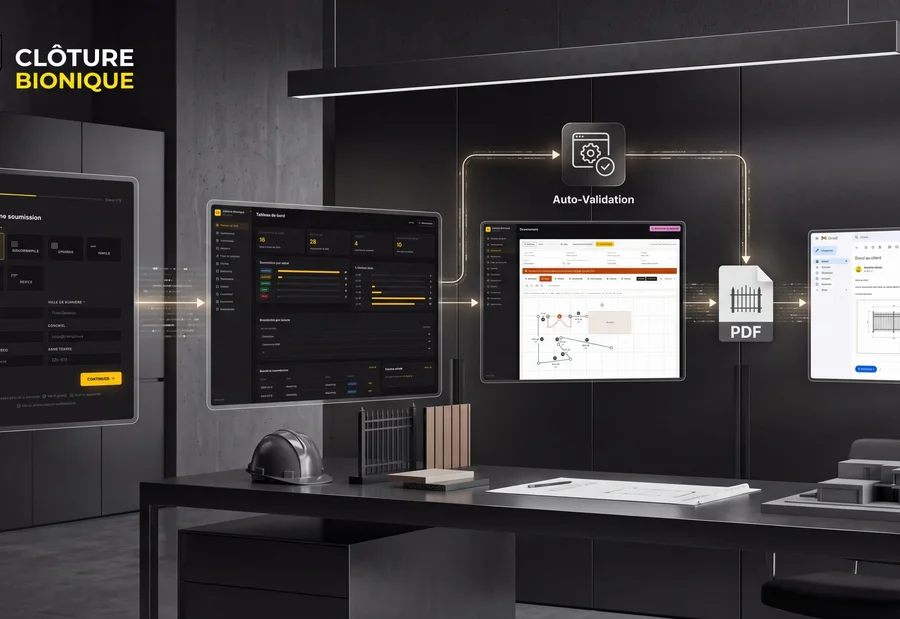
A closing request is not just a name and a phone number.

At Clôture Bionique, preparing a quote involved email exchanges, collecting field details and hand-drawn plans. Useful information was spread across several steps.

We connected the client form to a tracking dashboard and an integrated drawing tool. The estimator can work within the file, prepare the plan, and produce a quote accompanied by a PDF. The software thus takes the form of the work to be done.

Discover the project Bionic Fence
Presentation of the application and submission process · Clôture Bionique

The Clôture Bionique project presented here is a business web application. It illustrates a request and processing journey; it does not serve as a publication reference for mobile app stores.

What takes shape together

An application designed for real usage conditions.

At the workshop, on a site, or between appointments, phone usage changes. The mobile scope starts from these conditions before deciding on screens and technologies.

A priority mobile journey

Steps of a task, from opening to confirmation, with only the truly necessary information.

The validation pointGestures, fields, and readability are tested on selected screen sizes.

A platform decision

Reasoned choice between mobile site, PWA and distributed application, according to required device functions.

The validation pointCamera needs, notifications, or offline operation are verified on target devices.

Planned connection states

The expected behaviors during sending, in case of error, and when resuming after interruption.

The validation pointThe user knows if their action was recorded and what to do if it fails.

A recipe before release

Reference devices, test scenarios, and distribution steps corresponding to the chosen scope.

The validation pointThe distribution accounts and maintenance responsibilities are identified before availability.

Define what works offline

Offline consultation and delayed entry require precise rules. What data can remain on the device? How to indicate that a submission is still pending? What happens when two people modify the same file? These questions are studied before promising an offline mode. The scope can start with draft saving or local reading, then evolve according to field needs.

Connect the application to the rest of the work

A request sent from the phone must reach the right person and the right system. The project defines the APIs, access rights, and synchronization rules with the CRM or business software. Notifications are linked to useful events and explicit preferences. A connection error must remain understandable. Sensitive accesses are controlled server-side, and files follow agreed storage rules.

Prepare distribution and subsequent versions

Tests cover devices and versions retained in the mandate. If publication on stores is necessary, accounts, visuals, descriptions, and submission steps are prepared. Acceptance depends on the platforms concerned. We also define maintenance, updates, and user feedback handling. Launch can start with a pilot group to observe the journey before wider opening.

Choose according to your situation

Mobile site, PWA or distributed application?

Start from the task to perform and the devices used. Some capabilities depend on the browser, system, and permissions: they must be checked on your target devices.

CriterionMobile websitePWADistributed application
AccessFrom a link in the browser.From the browser, with possible installation depending on the device.Through a distribution channel adapted to the targeted audience.
Adapted usageConsult an offer, fill a form, or use an online space.Regularly find a web service with an application experience.Offer a recurring use with specific needs related to the device.
OfflineThe current path requires the network, except for functions designed otherwise.A part can be available offline if developed for that.Local storage and synchronization must also be designed and tested.
Device functionsBrowser-accessible capabilities must be verified.Camera, notifications, and other capabilities vary by environment.Selected functions require permissions and testing on targeted systems.
MaintenanceSite, browser and connected services.Web application, cache, updates, and compatibility.App versions, systems, distribution, and connected services.

A distributed application is not necessary for every mobile project. We validate decisive functions before choosing between Web, PWA, and app; the delivery channel is part of the scope.

Practical questions

Before starting

Do you develop for iPhone and Android?

The project can target both platforms. Technology and the level of code sharing are chosen according to functions, devices, and budget. Testing and distribution on each platform are specified in the quote.

Does a mobile application need a server?

Often, when sharing accounts, files, or data between users. A standalone application may have other needs. We distinguish between on-device operation and the service that stores the information.

Can you connect our existing software?

It depends on its APIs, your permissions, and its plan. We check possibilities before confirming synchronization. Test access and provider documentation facilitate this verification.

How to estimate the budget?

Describe users, actions, data and needs for camera, notification or network. These elements are more useful than a number of screens alone. We separate realization, distribution and operation.

Your turn

And at your place, how does it go?

A client request, the tools you use, and what is blocking you today: this information helps us suggest a concrete starting point.

Mobile application creation
Mobile process · Prototype · Development

Let's talk about your need

Would you prefer to speak to someone? +1 819 609-8335