Custom client portal

A client space to track requests and documents.

A space where your client finds their file and acts in the right place, while your team keeps control of the shared information.

Client spaceAccess to their own context
Ongoing processAn action, a clear response
Team viewClient and team remain connected

Your reality, our starting point

Documents · Requests · Tracking

A portal can serve construction companies, service firms, B2B distributors, and support teams that need to share documents, receive requests, and provide visibility on their processing.

A client portal is an area accessible after login where your clients find information related to their file. It can gather requests, documents, steps, and exchanges. Umbeli designs portals linked to your operations, with a scope defined according to what the client really needs to consult or do.

From need to process

The same file, two points of view.

Explore the steps. This scenario illustrates an operation to adapt to your business.

  1. After login, they access the files and documents intended for them. Rights are defined according to the people and organizations concerned.

  2. A request, a document to send or a validation finds its place in the process. The client knows what has been received and which step still requires their intervention.

  3. The file joins the internal operation and, if planned, the reference CRM. Shared exchanges remain distinct from notes reserved for your team.

Illustrative scenario

Client space

Access
Authorized user
Record
Visible according to rights
Documents
Shared versions

Access to their own context

Example of a process, without reservation or data submission.

Start with a useful journey

The first portal does not need to reproduce your entire internal system. Choose a recurring request: know the status of a quote, submit a document, or confirm information. Draw the client’s path and that of the person handling their request.

  • Distinguish internal information from shareable information.
  • Define authorized actions for each organization and user.
  • Plan invitations, access recovery and employee departure.
  • Choosing useful notifications without creating a new unnecessary message flow.
A portal complements the CRM

The CRM organizes your team’s work. The portal opens part of the journey to the client. You must decide which system keeps the reference file, which data is synchronized, and who validates a modification. A standard document library may suffice if you only need to share a few files.

On the ground · Bionic Fence

A closing request is not just a name and a phone number.

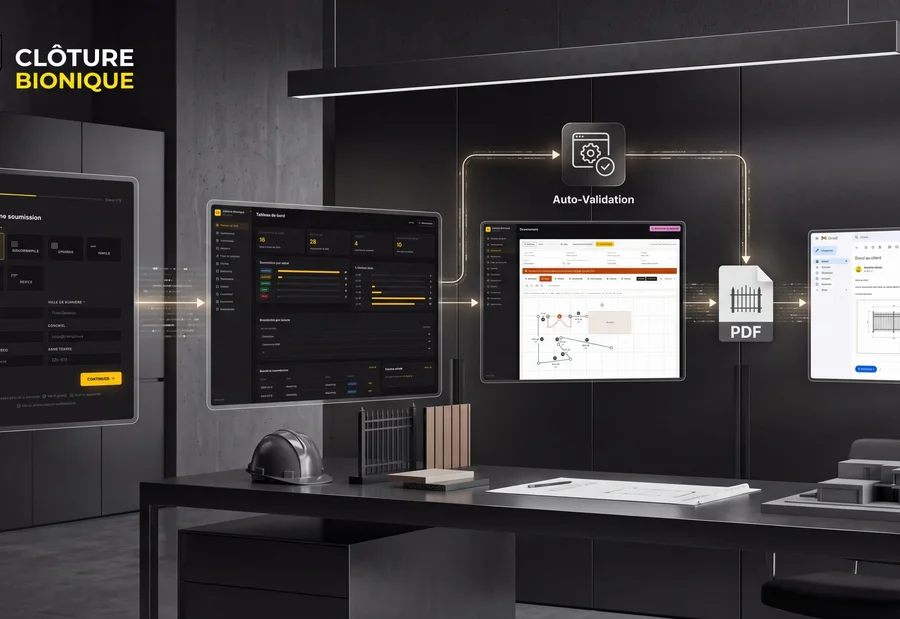
At Clôture Bionique, preparing a quote involved email exchanges, collecting field details and hand-drawn plans. Useful information was spread across several steps.

We connected the client form to a tracking dashboard and an integrated drawing tool. The estimator can work within the file, prepare the plan, and produce a quote accompanied by a PDF. The software thus takes the form of the work to be done.

Discover the project Bionic Fence
Presentation of the application and submission process · Clôture Bionique

This mandate links a client request to internal work. For your portal, the authenticated space, visible documents and authorized actions will be defined according to your clients’ needs.

Documents, roles and access control

The specifications must specify retention duration, accepted file types, and visibility of each document. Access controls are verified server-side, folder by folder. Tests include links sent to another account and users whose access has been revoked.

  • Mockups of the customer journey and internal management.
  • Development of selected functions and connection to accessible tools.
  • Tests of permissions and error cases.
  • Documentation, training and defined support conditions.

Choose according to your situation

A space in your current tool or a dedicated portal?

The portal must give the client a useful action: track a file, upload a document or validate a step.

CriterionExisting client spaceCustom portal
ProcessThe software functions cover your clients’ needs.You need to combine several tools or offer particular actions.
Access rightsControl available roles and file separation.Design and test permissions for each role and organization.
Documents and dataCheck what can be displayed, modified and exported.Define the reference source and synchronization rules.
OperationProvider package, limits and evolutions.Hosting, security, support and maintenance to organize.

A first portal can be limited to one file and one action. Pilot clients then help prioritize the next functions.

Evaluate cost and prepare launch

Roles, data recovery, number of integrations and documents influence cost more than the number of screens. A pilot group can test a first journey before general launch. Hosting, backups, monitoring, maintenance and third-party service fees must appear in the operating budget.

Practical questions

Before starting

Can the portal work on mobile?

The journey can be designed for a mobile browser. Offline needs, large files, and phone-specific functions must be specified separately; a native app is not systematically necessary.

Can we keep our current software?

Yes, if their integration possibilities allow the chosen journey. We check APIs, exports, and rights before promising synchronization.

Who owns the data and access?

Your company’s data remains yours. The contract must detail the accesses granted, export, delivered code, and third-party component licenses. The exit procedure and takeover by another provider must be defined before delivery.

Your turn

And at your place, how does it go?

A client request, the tools you use, and what is blocking you today: this information helps us suggest a concrete starting point.

Custom client portal
Documents · Requests · Tracking

Let's talk about your need

Would you prefer to speak to someone? +1 819 609-8335