Proudly made in QuébecFrom Trois-Rivières

Your operations. A single system.

Umbeli designs custom CRMs, automations, and digital tools to centralize leads, quotes, clients, and operations for construction and service companies.

  • Leads, quotes and files all in one place
  • Automated follow-ups, reminders and statuses
  • The office and field teams on the same information
See what can be automated

Let's talk about your construction company

Describe your field reality. We respond within less than one business day.

Would you prefer to speak to someone? +1 819 609-8335

    Your company has grown. Your processes, however, have remained manual.

    It’s not a motivation or skill problem. It’s a tools problem: with 3 employees, an email box and an Excel file suffice. At 15, they cost contracts.

    Leads that get lost

    A missed call, a form drowned in an email inbox: the request is never called back.

    Quotes never followed up

    They leave, then nothing. No one knows which are still open nor since when.

    Scattered information

    Texts, emails, photos, Excel files: the complete file of a client exists nowhere.

    Find other friction points

    Double entry

    The same information is retyped in the calendar, in the spreadsheet, then in the accounting software.

    Appointments scheduled manually

    Every appointment requires two or three phone back-and-forths.

    No clear view of opportunities

    Impossible to say in ten seconds how many quotes are pending, and for what amounts.

    The field cut off from the office

    Hours, photos and work orders are sent by text, or come back at the weekend.

    Copied invoices

    We take the hand-signed quote to produce the invoice, with the errors that implies.

    Each their method

    Two project managers, two ways of working, no shared history when one is absent.

    Software that do not communicate

    The website, the CRM, the calendar, and the accounting each operate separately.

    From the first request to final payment.

    A CRM for a construction company can link the initial request, estimation, follow-up of quotes, and useful site information. This journey is built according to your organization: each step can be equipped or connected, without imposing the same system on all teams nor automating everything at once.

    Prepare

    From the request to the proposed price.

    Lead

    A request arrives, no matter the channel. It must exist in the system before existing in an email inbox.

    • Website forms
    • Incoming calls
    • Facebook Ads
    • Google Ads
    • Automatic import

    Qualification

    Sort what is worth a trip from what is not, without spending the whole morning on it.

    • Qualification form
    • Business rules (zone, type of work, budget)
    • AI when relevant
    • Automatic attribution

    Appointment

    Schedule visits or inspections without phone back-and-forth.

    • Automatically proposed slots
    • Confirmation by SMS or email
    • Reminders before the visit
    • Calendar synchronization

    Estimate

    Measurements and photos from the field go directly into the file.

    • Mobile survey sheet
    • Photos attached to the file
    • Price and material templates
    • History of similar projects

    Quote

    Produce a clean document from already entered data, not a copied file.

    • Document generation
    • Internal approval
    • Send to client
    • Electronic signature

    Organize

    From decision to mobilized team.

    Follow-up

    The most profitable step, and the first to disappear when the season is busy.

    • Follow-up SMS
    • Email sequence
    • Internal reminder to the seller
    • Automatic status change

    Signature

    The transition from sales to production must be an event in the system, not an email.

    • Automatic deployment to production
    • Project file creation
    • Team notifications
    • Deposit or down payment triggered

    Planning

    Knowing who does what, which week, with which equipment.

    • Construction schedules
    • Team assignment
    • Equipment and subcontractors
    • Change notifications

    Execute and follow up

    From the construction site to client relationship.

    Intervention / site work

    What happens on the ground must reach the office the same day, not on Friday.

    • Mobile work order
    • Photos and site notes
    • Hours and attendance
    • Client signature on site

    Billing

    Bill based on what was actually done, without re-entering accounting data.

    • Invoice generation
    • QuickBooks synchronization
    • Online payment
    • Accounts receivable follow-up

    Client follow-up

    The part that generates feedback and referrals, and that is almost never done.

    • Post-work communications
    • Warranty and maintenance reminders
    • Google review request
    • Reactivation of former clients

    Your project, in practice

    Link the quote to fieldwork

    A CRM for construction serves to track the request, the quote, and the transition to operations. It does not automatically replace accounting, payroll, or planning functions already covered elsewhere.

    General and specialized contractors, fence installers, renovation teams, and other trades share needs for quotes, plans, documents, and follow-up between office and field.

    On the ground · Bionic Fence

    A closing request is not just a name and a phone number.

    At Clôture Bionique, preparing a quote involved email exchanges, collecting field details and hand-drawn plans. Useful information was spread across several steps.

    We connected the client form to a tracking dashboard and an integrated drawing tool. The estimator can work within the file, prepare the plan, and produce a quote accompanied by a PDF. The software thus takes the form of the work to be done.

    Discover the project Bionic Fence
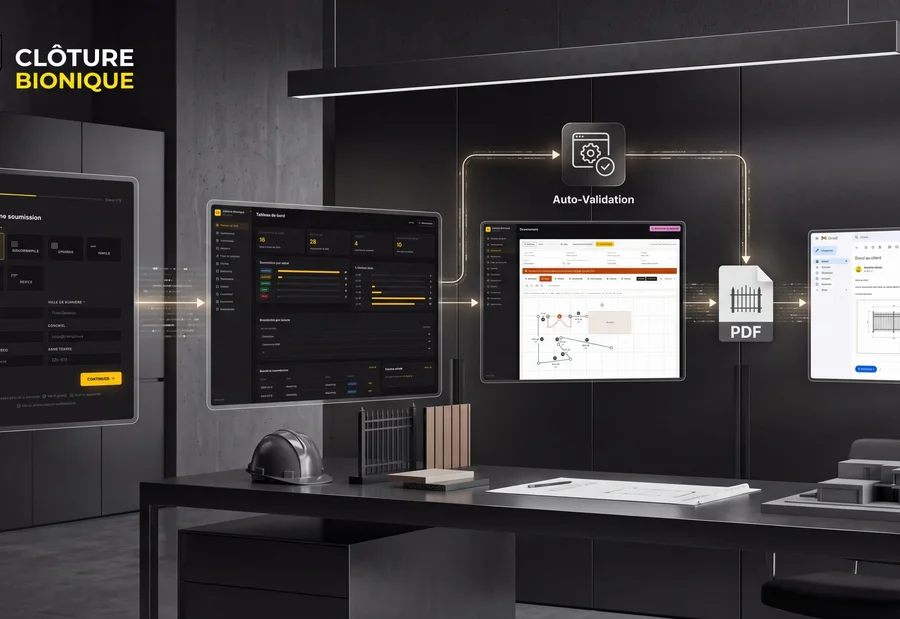

    Presentation of the application and submission process · Clôture Bionique
    Presentation of the application and submission process · Clôture Bionique

    Plans, measurements and documents are part of the file as much as contact details. The scope of your construction CRM is drawn from what the office and field teams must share.

    A CRM that works like your business operates.

    Most CRMs require your company to fit into their logic: their statuses, their fields, their way of naming a project. When your operations are specific, this results in workarounds, parallel files, and “Notes” fields containing the essentials.

    A custom CRM starts from the opposite: your steps, your vocabulary, your rules. We build the missing parts and connect the rest to what you already use.

    The office and the field share the same file.
    At the officeQuotes and scheduling
    Construction file
    PlanPhotosStatus
    On siteMeasurements and progress

    Principle diagram · access and exchanges to be defined with your team.

    What we can build, depending on the need

    What we can build, depending on the need

    • Custom pipelines
    • Client files
    • Project and site sheets
    • Lead management
    • Calendar and planning
    • Tasks and assignments
    • Quotes and estimates
    • Statuses and workflows
    • Documents and photos
    • Complete history
    • Dashboards
    • Roles and permissions
    • Automations
    • Client portal
    • Employee portal
    • Mobile field interface

    This is not a list of included features: it is the range of possibilities. A first useful system rarely contains all that — we build what solves a real problem, in the order where it costs the most.

    Automate what should no longer be manual to be done by hand.

    A useful automation always starts from a concrete trigger in your daily life. Here are examples of what we implement in field companies.

    A site form is filled outThe lead is created in the CRM, assigned to a salesperson, and confirmed to the client by SMS.
    An incoming call remains unansweredA record is created, a reminder is scheduled and the team is notified.
    An appointment is confirmedThe calendar is updated and reminders are sent to the client and technician.
    See other automation examples
    A quote is readyThe document is generated from the file, approved, then sent for signature.
    A quote remains unansweredA follow-up sequence triggers and the status changes automatically.
    A quote is signedThe project goes live and the administration receives the necessary information.
    A technician fills out their work orderHours, photos and notes are uploaded to the file, visible at the office the same day.
    A project is marked completedThe invoice is generated or synchronized with the accounting software.
    A client call endsA summary is added to the record, with key points and the next action.
    A document arrives (plan, supplier invoice, quote)Useful data is extracted and filed in the correct folder.
    Every morningDashboards are up to date: pending quotes, projects of the week, amounts at stake.

    Keep your tools. We make them work together.

    Integrating the CRM with already used tools helps coordinate office and site. We verify access, APIs, and data exchange with accounting, calendars, and business software. A tool that meets the need can be kept; missing functions are scoped separately.

    Information entered once, transmitted to the right tools.

    Accounting and payments

    • QuickBooks
    • Stripe
    • Accounting exports

    Email, calendar and documents

    • Google Workspace
    • Microsoft 365
    • Gmail
    • Outlook
    • Google Calendar

    Communications

    • SMS (Twilio)
    • Transactional email
    • Telephony

    Your current ecosystem

    • Website forms
    • Existing CRM
    • ERP
    • Business software
    • APIs

    These names are cited as examples of frequently connected tools. Umbeli is not an official partner of these publishers: the connection is made via their public APIs.

    AI where it belongs truly useful.

    AI is not the product. It is a system component, used when it saves time or reliability on a specific task — and set aside when a simple rule does better.

    Automation prepares; sensitive decisions remain validated.

    Qualification of requests

    Read an incoming request, extract the type of work, area, and urgency.

    Call summaries

    Turn a call into structured notes attached to the client file.

    Data extraction

    Extract useful information from a PDF, supplier invoice or purchase order.

    Explore other uses of AI

    Document analysis

    Compare a quote, a contract or a plan to your templates and report discrepancies.

    Assisted generation

    Prepare a draft quote, follow-up email or report.

    Lead classification

    Prioritize requests according to your historical criteria rather than order of arrival.

    Internal assistants

    Ask a question in natural language and get the answer drawn from your own data.

    Telephone agents

    Take a structured message outside business hours and create the corresponding record.

    Search in documentation

    Find a procedure, a technical sheet or a warranty without searching through files.

    Designed for businesses of construction and field.

    Tools vary from one profession to another, but the cycle remains the same: a request, a visit, a price, a follow-up, a project, an invoice. It is this cycle that we equip.

    Roofing

    Inspections, surveys, seasonal quotes, follow-ups.

    General construction

    Long projects, batches, subcontractors, amendments.

    Renovation

    Detailed quotes, phases, close client follow-up.

    Excavation

    Planning of equipment, locations, timesheets.

    Plumbing

    Emergencies, service calls, parts, quick billing.

    Electricity

    Service calls, recurring contracts, compliance.

    HVAC / air conditioning

    Installation, recurring maintenance, seasonal reminders.

    Building inspection

    Reports, photos, templates, delivery to the client.

    Landscaping

    Seasonality, recurring contracts, team routes.

    Technical services

    Mobile technicians, interventions, work orders.

    Two construction professionals consult a tablet in a house under construction
    Illustration photo · Mikael Blomkvist / Pexels
    From the office to the construction site

    Information must follow the people who work.

    A plan, photos, a quote: everyone finds the context of the construction site, without rebuilding the file at each exchange.

    PhotosPlanStatus

    What it might look like concretely?

    Illustrative scenario. The described company is fictitious: this is a workflow example, not a client case.

    A roofing company receives a request from its website.

    Unfold this example, step by step
    1. The lead automatically enters the CRM, with the source and type of work.
    2. The sector salesperson receives a notification.
    3. An inspection appointment is offered to the client.
    4. The client receives a confirmation by SMS, then a reminder the day before.
    5. Photos and measurements taken on the roof are uploaded to the file.
    6. The quote is generated from this data, then sent for signature.
    7. Without response after a few days, a follow-up sequence is triggered.
    8. At signature, the project goes into production and the project file is created.
    9. The administration receives the information necessary for planning.
    10. The invoice is generated and synchronized with the accounting software.
    11. The client receives follow-up communications and warranty reminders.

    Before

    Seven tools, manual tasks, scattered information

    • Requests arrive in a shared email inbox
    • Quote tracking lives in an Excel file
    • Appointments are set by phone and text
    • Photos remain on the teams’ phones
    • Quotes are created in a word processor
    • Hours are reported on paper at the end of the week
    • Invoices are manually copied into the accounting software

    After

    A connected workflow

    • All requests enter the same place, whatever the source
    • Every quote has a status, a date, and a responsible person
    • Appointments confirm and remind themselves automatically
    • Photos, measurements, and notes are attached to the file
    • The quote is generated from the data already entered
    • Field hours are reported the same day
    • Billing starts from what has actually been done

    When an existing software is sufficient, we will tell you.

    If Jobber, HubSpot, Monday, QuickBooks or another market software already meets your need, rebuilding has no interest. It costs more, takes longer, and you lose the ecosystem that comes with it.

    An off-the-shelf software is probably the right choice if…

    • Your process resembles that of the majority of your sector
    • A single tool covers the essentials of your cycle
    • The limitations you encounter are habits, not business constraints
    • You are starting and need to structure quickly, not develop

    Custom solutions become relevant when…

    • Several tools must be connected to each other
    • Your workflow is truly specific to your way of operating
    • Many manual tasks remain despite existing software
    • Current tools become limiting instead of helping
    • You want to centralize your operations rather than distribute them
    • A specific interface is necessary (field, client portal, workshop)
    • The cost of licenses or the complexity of the existing system becomes a problem in itself

    In many cases, the right answer is mixed: we keep your software, connect them, and develop only what is missing.

    How we work on an operations project.

    01

    Understanding your operations

    We map what really happens today: who does what, with which tool, and when. Without judgment on the existing.

    02

    Identify frictions

    We identify what can be simplified, connected, or automated — and what must remain human.

    03

    Design the system

    We define the workflows, interfaces, and necessary integrations, with a clear priority order.

    04

    Develop and connect

    We build progressively, in usable pieces, rather than in one big single deployment.

    05

    Deploy and improve

    The system is put in the hands of teams, adjusted, then expanded at the company’s pace.

    Less data entry. More visibility.

    Less manual and double data entry
    Fewer leads and forgotten quotes
    A clear view of what is pending
    Fewer isolated software
    More predictable processes from one employee to another
    Better customer follow-up, before and after work
    Centralized and retrievable information
    Growth easier to handle
    Less dependence on repetitive administrative tasks

    No quantified promise here: gains depend on your volumes, current processes, and what you decide to automate. We estimate them together, based on your figures.

    Types of systems that we implement.

    Umbeli is a development agency: construction is a vertical, not our only playground. Here are the building blocks we assemble according to needs.

    Custom CRM and pipelines

    Files, statuses, estimates and dashboards designed around your real cycle.

    Client and employee portals

    A space where the client follows their project and the team accesses what it needs.

    Internal business tools

    Calculators, price templates, document generators, planners.

    Integrations and synchronizations

    Circulate information between website, CRM, calendar, telephony, and accounting.

    Mobile interfaces for the field

    Work orders, photos, hours and signatures, usable on a construction site.

    Automations and AI agents

    Workflows, follow-ups, extractions and assistants connected to your own data.

    A concrete first scope

    Start with a file the whole team can follow.

    In construction, a request becomes a visit, measurements, and a quote. In a workshop, it relates to a vehicle, a service, and availability. For a B2B team, it goes through qualification and follow-ups. Fields and responsibilities must follow these trades.

    01

    The first delivery.

    A first useful path, then evolutions guided by usage.

    A first batch can cover contacts, files, commercial steps, tasks, and access rights. A small group tests the journey on real cases. Imports start with a sample: field matching, duplicates, documents, and verification by your team.

    Generating quotes, a field schedule, a client portal or an accounting connection are then decided. They require their own rules and tests. Replacing payroll or all accounting is not implicit in creating a CRM.

    02

    The budget over time.

    Distinguish project creation from its daily operation.

    Compare over the same duration: initial design and migration, hosting, backups, maintenance, licenses and third-party service consumption. Custom can avoid some functional limits but does not remove operating costs.

    A file must be able to pass from one person to another without losing its history. The lead verifies permissions, imports, reminders, and exports. Training covers these same tasks; the contract sets the access granted, support, and maintenance responsibilities.

    A spreadsheet, a standard CRM or a custom CRM?

    The right choice depends on your files, your team, and the necessary connections. Here are the trade-offs to consider before investing.

    CriterionShared spreadsheetConfigured standard CRMCustom CRM
    When appropriateSmall volume and simple tracking, with few people.Common sales stages and need to start with proven functions.Rules, documents or flows difficult to cover with existing tools.
    ImplementationQuick to create structure; conventions and data quality to maintain.Configuration, import and training; adaptation of certain habits.Framing, mockups, development and pilot before generalization.
    Full costPossible license and time spent on handling and control.Subscriptions, configuration, modules and possible connectors.Initial investment, hosting, maintenance, and possible third-party services.
    Connections and business rulesExports and scripts possible, with caution on duplicates.APIs and connectors depending on the tool and its plan; limits to verify.Connections designed for the process, subject to access to third-party systems.
    Permissions and historyDepend on the spreadsheet; a shared file does not replace detailed business tracking.Functions available depending on product; check roles and exports.Roles, history and exports to be explicitly designed and tested.
    Evolution and maintenanceFlexible at first; formulas and versions become harder to follow as it grows.Evolutions managed by the publisher, with dependence on their choices and rates.Evolutions prioritized by your company, with a budget and maintenance responsibility.

    These are decision markers, not universal features. Check the offers, licenses, and commitments of the chosen provider over the same scope and duration.

    What we are asked most often.

    No price is displayed because a custom CRM is not a standard product: the budget depends on the number of workflows, necessary integrations, and whether there is a mobile interface for the field. The gap is real between automating a quote cycle on an existing CRM and developing a complete system. Pricing is done after mapping your operations and broken into stages so you do not pay all at once.

    We work by successive deliveries rather than a single big deployment. A first useful brick — for example centralizing leads and tracking quotes — is set up well before the complete system. The rest is added later, at the pace of the business and your seasons: we generally avoid deploying at peak production periods.

    Yes, when the software exposes an API — this is the case for QuickBooks and most cloud solutions. Depending on the case, we synchronize clients, signed quotes, invoices, or payments. When the tool is old or closed, we use structured exports/imports, which is still preferable to manual re-entry.

    Rarely, and it is not the starting point. In many companies, existing software works well: the problem is that they do not communicate. So we start by connecting the existing and developing only the missing parts. Replacement is only considered if a tool has become a real obstacle.

    Tracking and follow-up of quotes can be automated from the file: document preparation, sending after validation, status and reminders. Rules provide for stopping follow-ups after a response or signature and exceptions to be handled by the team. Price and technical judgment remain human: the software prepares the information, it does not decide for you.

    Yes, when it solves a specific problem: qualifying an incoming request, summarizing a call, extracting data from a PDF, finding information in your documents. We integrate it as a system component, with safeguards and human validation on what commits the company. When a simple rule does the job, we use a simple rule.

    Yes, if the scope matches the needs of the small construction business. Centralizing requests, tracking quotes, and transmitting documents to the field can be a first step. Accesses are adapted to roles, from office to site. If a market tool already covers these uses, configuring or connecting it may suffice.

    Yes. Site forms, quote requests, calls, and advertising campaigns can feed directly into the CRM, with the source preserved. This is often the first task: it is quick, visible, and immediately stops loss of requests.

    A market CRM gives you a proven structure immediately, against a subscription and the obligation to follow its logic. A custom CRM starts from your steps, vocabulary, and rules, and belongs to you — in exchange for a higher initial investment and maintenance to plan. The right criterion is not preference, but the gap between your real process and what the market tool accepts.

    This is even the main interest. A custom-developed system scales when you add a division, a service type, a team, or a branch. We design from the start with this assumption: roles and permissions, structured data, replaceable integrations. The contract specifies the delivered code, third-party licenses, and access; documentation and data export prepare for a possible takeover by another provider.

    You already know that your operations could be simpler.

    Show us how your company operates today. We will tell you what can be connected, automated, or centralized — and what is not worth it.

    A first exchange, without commitment. Bring your irritations, not a specification document.