Business process automation

Business process automation: give your teams time back.

A form arrives, someone copies the information, another waits for a response. We work on these handoffs so the file progresses with the right context.

Starting pointA new request

Rules. A journey. A sequence.

Authorized sourcesControlled actions
Business fileContext preserved
Human resumptionVisible exceptions
Journey illustration · conceptual interface

Your reality, our starting point

Process · Connections · Follow-up

For administrative and commercial services, construction, distributors, workshops, and service companies using multiple software.

Automating a business process involves executing certain steps according to explicit rules. This can be data transfer, file creation, an alert, or document preparation. Umbeli starts by observing the current work and its exceptions. We then connect the tools when access allows, with controls to detect errors and a recovery procedure. The goal is to make the workflow more reliable and clearer for your team.

From need to process

A request enters once, then follows its path.

Explore the steps. This scenario illustrates an operation to adapt to your business.

  1. The request comes from the form or the source software. Essential fields and duplicates are checked before proceeding.

  2. The file joins the reference system. Human validation remains visible if the path requires it.

  3. The team receives a useful alert when the process fails. It sees what has already been done before resuming.

Illustrative scenario

Entry point

Trigger
New request
Control
Fields and duplicates
Error
To complete

Qualified request

Example of a process, without reservation or data submission.

Track a file from start to finish

An isolated automation can shift the problem to the next step. We start from a real file to identify collected information, validations, and handoffs between people. Delays, duplicates, and manual searches become visible. This mapping helps choose a useful first path. It also distinguishes what must be simplified in the work method from what can be entrusted to software.
Choose the rules before choosing the tools

A rule must explain when processing starts, what it checks, and what a successful result looks like. Exceptions deserve as much attention as the normal path. What if a client already exists, an address is missing, or the software does not respond? We describe these situations with your team. A standard connector may suffice; a specific development addresses rules not covered.

On the ground · Masterliner

A contact list needed to find its context.

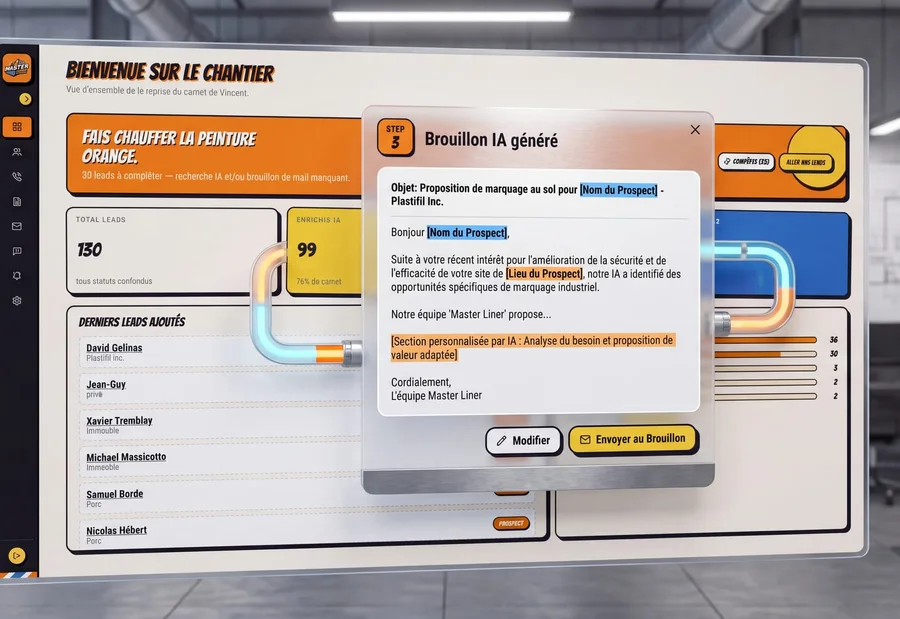
After taking over Masterliner, the manager had contacts to reactivate. To resume a useful relationship, it was first necessary to understand each company and prepare a relevant message.

The "Le Chantier" platform gathers contacts, searches for information, and prepares email drafts. The manager reviews them on their dashboard before approving the communication. AI prepares the work; the decision remains visible and human.

Discover the project Masterliner
Presentation of the prospecting system “Le Chantier” · Masterliner

What takes shape together

A visible process, including when it deviates from the planned scenario.

Automation does not stop at the first successful send. To be exploitable, it must explain what circulated, what failed, and how to resume work.

A process map

The trigger, the steps, the responsible parties, and the exceptions observed in the current operation.

The validation pointA real file can be tracked from arrival to expected result.

Circulation rules

Field mapping, reference source and controls before creation or update.

The validation pointIncomplete data and repeated events are handled without multiplying records.

A recovery journey

Alerts, retry attempts, and escalation to a person when an action cannot be completed.

The validation pointA failure is visible and the manager knows how to resume without restarting the entire process.

A transfer to your team

Connection documentation, access and responsibilities on subscriptions and monitoring.

The validation pointYour team knows how to recognize a connection failure and request a rule change.

Keep a record of what has been done

The team must be able to find the state of a process and understand why it stopped. Logs, alerts, and tracking screens are defined according to the importance of the path. The same event received twice must not create two files without control. Retry attempts respect effects already produced. Technical accesses remain limited to necessary operations, and sensitive information is not exposed in error messages.

Use AI when the task justifies it

A field transformation or a date rule does not always need AI. A model can be useful to classify text, extract information, or prepare a draft, with appropriate controls. Decisions requiring judgment keep human validation. In the workflow, it must be clear what comes from a rule, what was proposed by AI, and what was approved by a person.

Measure the path and prepare its maintenance

Before the pilot, we define useful observations: files processed, errors detected, recoveries, and time spent on the relevant steps. Results are compared to a documented baseline. Operation also depends on your providers’ APIs and subscriptions. The mandate specifies who receives alerts, who maintains connections, and how to revert to manual procedures when processing must be suspended.

Choose according to your situation

Connector, automation platform, or custom processing?

The right tool covers real exchanges, including their errors. A representative trial identifies limits before automating the entire process.

CriterionNative connectorAutomation platformCustom processing
Starting pointYour software already offers the necessary exchange.Connectors cover expected tools and operations.Formats, rules, or volumes exceed available possibilities.
CustomizationFields and options provided by the editors.Steps and conditions assembled in the platform.Rules developed for your business journey.
Error managementDepends on connector controls and logs.Resumptions and alerts depend on the scenario and package.Resumptions, alerts, and controls are defined in the mandate.
Cost to reviewLicense and possible integration option.Subscription, consumed operations, and scenario maintenance.Development, possible hosting, monitoring and maintenance.
Condition of choiceA test covers common data and exceptions.Usage limits and permissions suit the process.APIs and access truly enable the exchanges to be developed.

Several approaches can coexist. We reserve specific development for steps that require it and assign a responsible for each connection.

Practical questions

Before starting

Should we change our software?

Not necessarily. We first check the possibilities of current tools. A connector, API, or controlled import may suffice. A replacement must respond to an identified limit.

Which processes to automate first?

Repeated tasks with fairly stable rules and accessible data are good candidates. The choice also considers possible errors and the team's capacity to resume work.

Can we keep human validation?

Yes. The process can prepare an action, present information, and await approval. This step must be visible, assigned to a responsible person, and followed up in case of delay.

How to know if the project is profitable?

One must observe a starting situation and compare realization and operation costs to actual changes observed. We avoid promising quantified gains without data from your activity.

Your turn

And at your place, how does it go?

A client request, the tools you use, and what is blocking you today: this information helps us suggest a concrete starting point.

Business process automation
Process · Connections · Follow-up

Let's talk about your need

Would you prefer to speak to someone? +1 819 609-8335